pickvedio.
LOCAL-FIRST VIDEO NOTES本地优先的视频笔记V0.1.0

Keep the
meaning.
留住
意义。

让视频,成为你的知识。Turn videos into knowledge you can keep.

一条链接,一份可回看的研究笔记。One link. A research note you can revisit.
从本地转写到分层总结,把长视频里的观点、Local transcription and layered summaries preserve the ideas,
时间线和细节,留在你的工作区。timelines, and details of long videos in your workspace.

WINDOWSWindows 桌面BILIBILI + YOUTUBEB 站 + YouTubeMIT LICENSEMIT 开源许可
A VIDEO BECOMES A NOTE从视频到笔记

从 48 分钟,到一份清晰的笔记From 48 minutes to one clear note

RESEARCH NOTE / 001研究笔记 / 001人工演示Written example

把信息,Make information
变成自己的理解。part of your own understanding.

一句话结论The takeaway

好的笔记保留观点之间的关系,也保留值得回到原话的线索。Good notes preserve how ideas connect and where to return to the original words.

MD · TXT · SRT · VTT · JSON
01 / WATCH LESS. UNDERSTAND MORE.01 / 少一点遗忘,多一点理解。演示内容 · 非真实视频输出Illustrative content, not output from a real video
本地 Whisper 转写Local Whisper transcription长视频分层总结Layered long-video summaries顺序批量队列Sequential batch queue自选 AI 模型Your choice of AI model独立文件导出Separate file exports

01 / YOUR VIDEO WORKSPACE01 / 你的视频工作区

观看之后,After watching,
理解才刚刚开始。understanding is just beginning.

给长视频一个有条理的归宿。Give long videos an organized home.
每个项目都有自己的总结、逐字稿和处理记录。Every project has its own summary, transcript, and processing record.

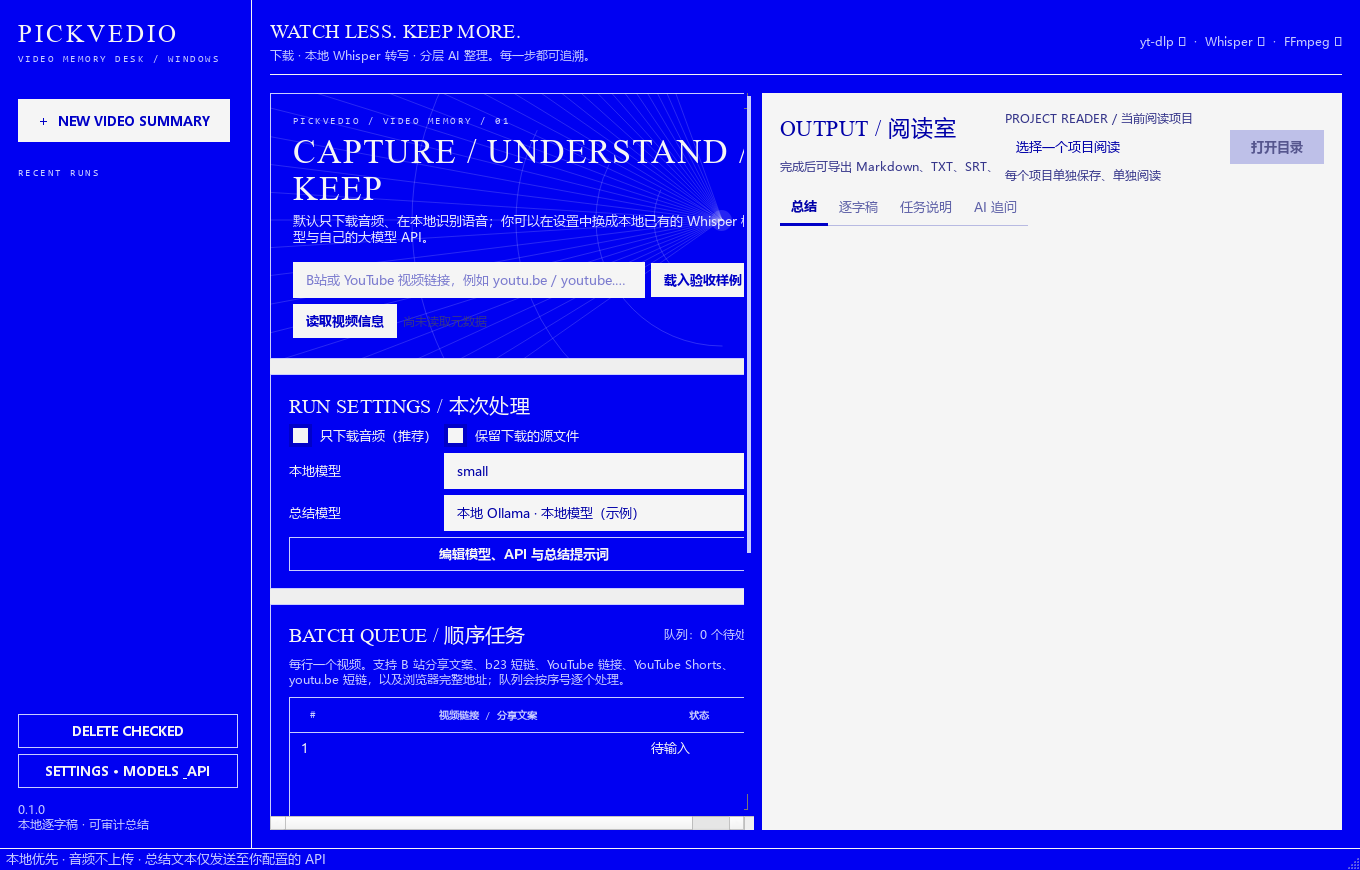
PICKVEDIO / DESKTOP WORKBENCHPICKVEDIO / 桌面工作台实际应用界面 · 空白工作区Actual application UI · empty workspace
pickvedio 桌面工作台,包含视频输入、批量队列、处理进度、历史记录与结果阅读区域
你的研究工作台:导入链接、处理队列、阅读结果,都在一个窗口。Your research workspace: import links, process the queue, and read results in one window.
01

一次整理,多条视频。One queue. Multiple videos.

粘贴分享文案,或从 TXT / Markdown 导入链接。队列顺序处理,每条视频独立生成文件;一条失败,继续处理下一条。Paste shared links or import them from TXT / Markdown. Videos are processed in order and exported separately. One failure does not stop the next item.

BATCH / 顺序处理BATCH / SEQUENTIAL
02

长内容,也能有清晰脉络。Long content can still have a clear structure.

长音频分段转写,逐字稿按长度与时间戳切块。先整理片段,再聚合总结,让章节、观点与依据一起留下。Long audio is transcribed in segments. Transcripts are split by length and timestamp boundaries, summarized in parts, then combined with chapters, claims, and evidence intact.

CHAPTERS / 分层整理CHAPTERS / LAYERED NOTES
03

读完笔记,还可以继续问。Read the notes. Keep asking.

切换总结与逐字稿,使用基于总结资料的 AI 追问。为通用研究、访谈、教程分别编辑提示词,把输出变成适合自己的笔记。Switch between summary and transcript, then ask AI about the summary. Customize research, interview, and tutorial prompts to shape the notes you need.

FOLLOW-UP / 深入理解FOLLOW-UP / DEEPER UNDERSTANDING

A QUIET PLACE TO READ留一处安静的阅读空间

从处理界面,From processing
走进阅读现场。to a place to read.

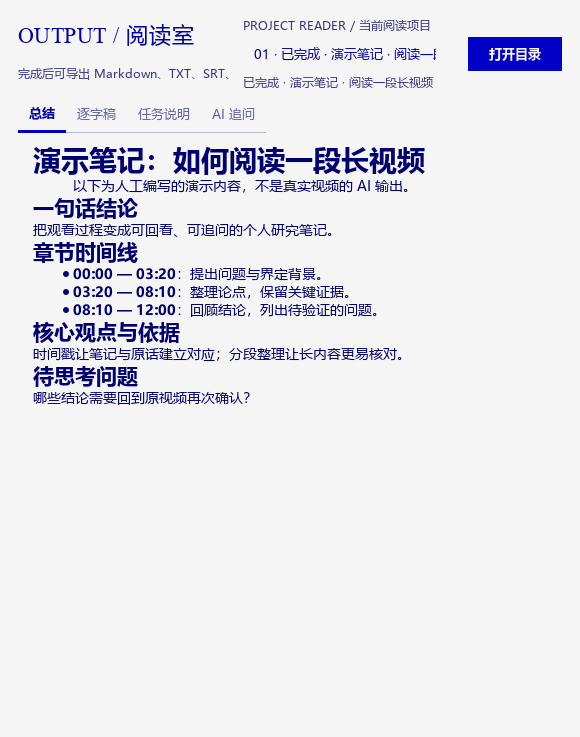
总结、逐字稿、任务说明、AI 追问。Summary, transcript, task details, and AI follow-up.
随时在项目之间切换,回到你想核对的内容。Switch projects and return to the details you want to verify.

实际阅读界面 · 人工编写的演示笔记Actual reader · manually written example notes
pickvedio 纸白阅读面板,展示人工演示总结及总结、逐字稿、任务说明和 AI 追问标签

02 / FROM LINK TO KNOWLEDGE02 / 从链接到知识

处理在本地。Processing stays local.
模型由你选。The model is your choice.

下载、音频处理、语音转写和导出留在本机。Downloading, audio processing, transcription, and exports stay on your computer.
总结在哪发生,取决于你配置的后端。Where summarization happens depends on the backend you configure.

  1. 01

    带来一条链接Bring a link

    B 站、YouTube、Shorts、分享短链,或浏览器扩展里的当前页面。Use a Bilibili, YouTube, Shorts, or shared video link, or capture the current page with the extension.

    YT-DLP / MEDIAYT-DLP / 媒体下载
  2. 02

    听清每一句话Transcribe every line

    音频转为单声道 16 kHz。Whisper 在本机转写,保留时间戳。Audio is converted to mono at 16 kHz. Whisper transcribes it locally with timestamps.

    FFMPEG + WHISPERFFMPEG 处理 + WHISPER 转写
  3. 03

    整理成研究笔记Build research notes

    片段总结、章节聚合、最终整理。选择本地模型或云端 API。Summarize segments, combine chapters, and produce final notes using a local model or a cloud API.

    OLLAMA / YOUR APIOLLAMA / 你的 API
  4. 04

    保留,也带走Keep it. Take it with you.

    每条视频独立输出总结、逐字稿和字幕,随时用熟悉的工具阅读。Each video has separate summary, transcript, and subtitle files, ready for the tools you already use.

    MD / TXT / SRT / VTT / JSON

FOLLOW YOUR DATA了解数据去向

你的文本,会去哪里?Where does your text go?

视频 / 音频Video / audio本机文件Local files
逐字稿Transcript本地 WhisperLocal Whisper
本机 OllamaLocal Ollama127.0.0.1

当 Ollama 地址设为本机回环地址,逐字稿和总结请求在本机完成;首次下载视频、工具或模型仍需联网。With Ollama set to a loopback address, transcript and summary requests stay on your computer. Initial video, tool, or model downloads still need internet access.

看到值得记住的视频,就带回本地。Bring videos worth remembering back to your computer.

Chrome 扩展把当前页面送入本机队列。它复用桌面配置,通过本机桥接读取处理进度与结果。The Chrome extension sends the current video to a local queue. It reuses desktop settings and reads progress and results through the local bridge.

扩展安装说明Extension setup ↗

03 / MAKE IT YOURS03 / 开始使用

把下一条视频,Make your next video
放进你的工作区。part of your workspace.

V0.1.0 · 源码候选版V0.1.0 · desktop source candidate
Windows 10 / 11 · Python 3.11 / 3.12

从源码运行Run the desktop app from source

  1. 准备 64 位 Python 与 FFmpeg,获取完整项目源码。Prepare 64-bit Python and FFmpeg, then obtain the complete desktop application source.
  2. 在项目根目录执行右侧命令,创建环境并启动桌面版。Run these commands from the desktop project root to create its environment and launch the app.
  3. 在设置中选择 Whisper 模型,以及 Ollama 或你的 AI API。Choose a Whisper model and either Ollama or your AI API in Settings.

首次使用 Whisper 模型名称可能需要下载权重。可填入已有模型目录;Ollama 模型需提前安装。Using a Whisper model name for the first time may download weights. You can use an existing model directory instead. Install your Ollama model in advance.

阅读完整 READMERead the setup guide
POWERSHELL / 项目根目录POWERSHELL / DESKTOP PROJECT ROOT
powershell -ExecutionPolicy Bypass -File .\scripts\setup_dev.ps1
.\.venv\Scripts\python.exe .\app.py
FFmpeg 需加入 PATH,或在软件设置中指定路径。Add FFmpeg to PATH or set its path in the desktop app.

开始前,你可能想知道Before you start

可以完全使用本地模型吗?Can I use only local models?

可以。安装 Whisper 权重与 Ollama 模型后,使用本机 Ollama 地址即可在本地完成转写和总结。视频下载仍需要网络;模型是否适合你的电脑取决于内存、显存和模型大小。Yes. Once Whisper weights and an Ollama model are installed, a local Ollama address keeps transcription and summaries on your computer. Video downloads still need internet access. Model suitability depends on RAM, VRAM, and model size.

支持哪些输入和输出?What inputs and exports are supported?

当前处理 B 站与 YouTube 视频链接,也能识别分享文案、短链和 Shorts。TXT / Markdown 导入的是视频链接列表。总结导出为 Markdown、TXT、JSON,逐字稿导出为 TXT、JSON、SRT、VTT;当前没有本地视频文件导入入口。The app accepts Bilibili and YouTube links, shared text, short links, and Shorts. TXT / Markdown import reads lists of video links. Summaries export to Markdown, TXT, and JSON; transcripts to TXT, JSON, SRT, and VTT. Direct local video file import is not currently available.

云端 API 会收到哪些内容?What does a cloud API receive?

会收到总结需要的逐字稿片段、分段摘要、视频标题,以及追问所用的总结资料和问题。媒体下载和语音转写在本机进行。API Key 保存于系统凭据库。It receives transcript segments, partial summaries, video titles, and the summary material and questions used for follow-up. Media downloads and transcription happen locally. API keys are saved in the system credential store.

失败之后可以断点续跑吗?Can a failed task resume from a checkpoint?

当前保留历史记录和中间文件,但没有自动断点续跑。重跑脚本会创建新任务并重新执行完整流程。媒体访问、网络、模型内存与 API 配额都可能影响处理结果。History and intermediate files are retained, but automatic checkpoint resume is not implemented. Rerunning creates a new task and repeats the full pipeline. Access, network conditions, model memory, and API quotas affect results.

开源版本和安装包的状态是什么?What is the desktop release status?

当前为本地准备的 0.1.0 源码候选版,按 MIT 许可整理。新仓库地址和新版 EXE 尚未发布;此页面不提供未发布的下载链接。可先从源码运行,后续发布信息应以项目 README 为准。The desktop application is a locally prepared MIT-licensed 0.1.0 source candidate. Its source repository and new EXE have not been published. The website repository contains this presentation site, not the desktop app. Desktop downloads will be added when available.